

When running an online business, choosing the right payment gateway not only affects operating costs but also directly impacts conversion rates and customer trust. Among the most popular platforms today, Stripe and PayPal are always the two names that come up in comparisons. However, to make the right choice, businesses need to clearly understand their similarities, core differences, and how well each platform aligns with their actual business model. This article will help you evaluate Stripe and PayPal from a practical, clear, and actionable perspective.
Similarities Between Stripe and PayPal
Before delving into the differences, it’s important to recognize that Stripe and PayPal share many core similarities. Therefore, in many basic scenarios, businesses don’t need to worry too much when choosing between these two platforms. The main similarities lie in payment processing capabilities, security, and transaction support.
Supports popular payment methods
Payment by credit card and debit card
Both Stripe and PayPal support most major credit cards. This makes it easier for businesses to reach customers worldwide. Integrating credit cards does not pose any major technical challenges.
The types of cards typically supported include:
- Visa, Mastercard, American Express
- Domestic and International Cards
- Debit Cards and Credit Cards
A variety of flexible transaction options
In addition to online payments, both platforms support several other payment methods. Businesses can process transactions in person or manually enter card information. However, manual entry typically incurs higher fees.
Transaction types include:
- Online Payment
- Direct Payment
- Manually enter the card number
Security and Transaction Management
High-standard security system
Both Stripe and PayPal invest heavily in security. Transaction data is fully encrypted. Users can also enable two-factor authentication.
Key security features include:
- End-to-end data encryption
- Two-Factor Authentication (2FA)
- Fraud Detection Tool
Reporting and Tracking Transactions
Both platforms allow you to export transaction reports. PayPal has a more intuitive interface. However, Stripe still meets basic tracking needs well.
- Reporting capabilities include:
- Detailed Transaction History
- Export a simple report file
- Track revenue over time
An Overview of Stripe and PayPal
Costs and Fee Structure
Level of Transparency Regarding Service Fees
Stripe stands out for its simple and transparent fee structure. Many advanced features are offered for free. This makes it easier for businesses to budget their expenses.
Stripe's fee structure includes:
- Fixed fee per transaction
- Fewer additional charges
- Easy to monitor and control
PayPal's Complex Fee Schedule
PayPal has a detailed fee schedule, but it’s quite complex. Costs can easily rise if you use additional features. Even the basic service may incur additional fees.
Some points to note:
- High currency conversion fees
- Fees for Additional Services
- Higher complaint fees than Stripe
User Experience and Brand Trust
PayPal's Global Brand Advantage
PayPal is a brand that is familiar to the general public. Many customers feel reassured when they see the PayPal logo. This is especially helpful for customers who are less tech-savvy.
The main advantages of PayPal include:
- High brand recognition
- Create a sense of security during payment
- Suitable for the mass market
Stripe is a good fit for tech companies
Stripe is highly regarded in the startup and SaaS communities. The platform is flexible and developer-friendly. Businesses can easily customize it to meet their needs.
Stripe is a good fit when:
- Businesses need to integrate deeply
- Has an in-house technical team
- Want to optimize the payment experience?
| Criteria | Stripe | PayPal |
|---|---|---|
| Easy to use | ⭐⭐⭐ Needs to be integrated into the website; basic programming knowledge required | ⭐⭐⭐⭐ Quick setup via an external payment gateway; advanced customization requires the Pro plan |
| Costs and Service Fees | ⭐⭐⭐⭐⭐ Simple, fixed-rate pricing based on a percentage + transaction fees | ⭐⭐ Complex fees, many additional costs |
| Recurring Payments | ⭐⭐⭐⭐⭐ No setup fees, lower transaction fees | ⭐⭐⭐⭐ Free to set up, but higher transaction fees |
| Postpaid Option | ⭐ Support is available only through third-party integrations; fees are high | ⭐⭐⭐⭐⭐ Available, no additional fees |
| International Payments | ⭐⭐⭐⭐⭐ Low fees, supports over 135 currencies | ⭐⭐ Higher fees; fixed fees vary by country |
| Customize the payment gateway | ⭐⭐⭐⭐ Free, flexible | ⭐⭐⭐ Requires the Pro plan ($25/month or $30/month) |
| Brand Trust | ⭐⭐⭐⭐ Growing rapidly but not yet as widespread as PayPal | ⭐⭐⭐⭐⭐ High brand recognition, widely trusted |
| AI-powered features | ⭐⭐⭐⭐ AI integration enhances security and optimizes payments | ⭐⭐⭐ A significant investment, but few specific AI features |
AI Integration: Stripe has a slight edge
Neither Stripe nor PayPal focuses heavily on AI, but Stripe currently offers some more useful AI features.


Payment Options: Flexible Stripe, Popular PayPal
PayPal is easy to use but redirects customers, while Stripe allows for direct payments and brand customization.
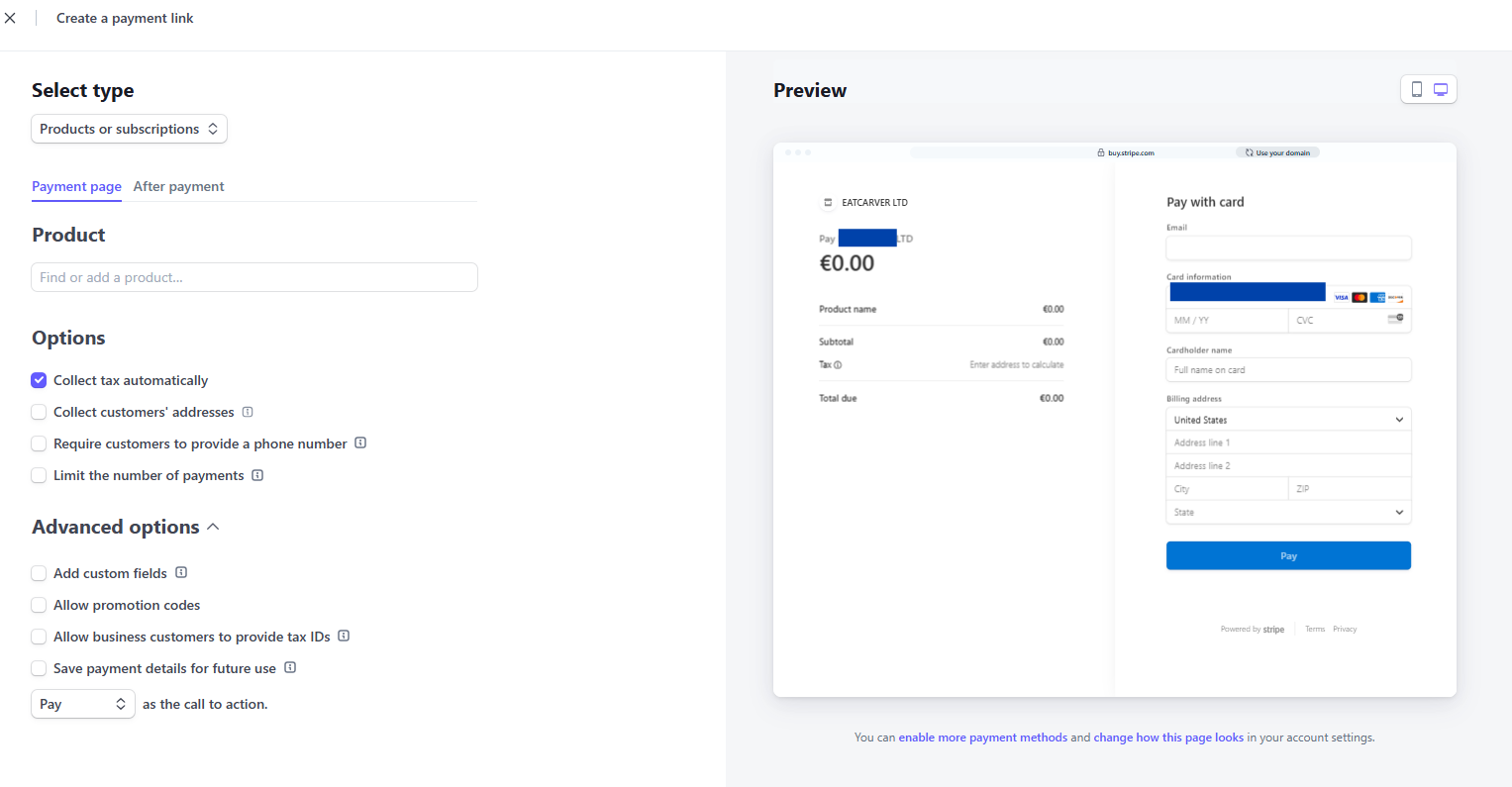
Stripe is usually cheaper for most transactions and has no hidden fees
It’s hard to deny: PayPal’s fee structure is truly complex and a headache. Each type of transaction has different fees, and to figure out the exact flat fee for each case, you have to consult a series of complicated tables.
Meanwhile, Stripe keeps things much simpler. Stripe’s online transaction fees are virtually fixed at just 2.9% plus $0.30 per transaction. Although Stripe does have some separate fees for special services like ACH transfers or wire payments, in most cases, you don’t have to worry about figuring out exactly how much you’ll be charged. More importantly, Stripe’s fees are typically lower than PayPal’s for many types of transactions.
PayPal offers a free "Pay Later" option, but if customers choose to pay in monthly installments ("Pay Monthly"), the interest rate ranges from 9.99% to 35.99% APR. Stripe does not offer its own "Pay Later" service, but you can integrate third-party platforms such as Affirm, Afterpay, or Klarna, with fees of approximately 6% plus $0.30 per installment.
PayPal does not charge any additional fees when you send an invoice; only the standard transaction fees apply. Meanwhile, Stripe charges an additional 0.4% on the Starter plan and 0.5% on the Plus plan for each invoice paid. However, when considering total transaction fees, Stripe may still be cheaper than PayPal in many cases.
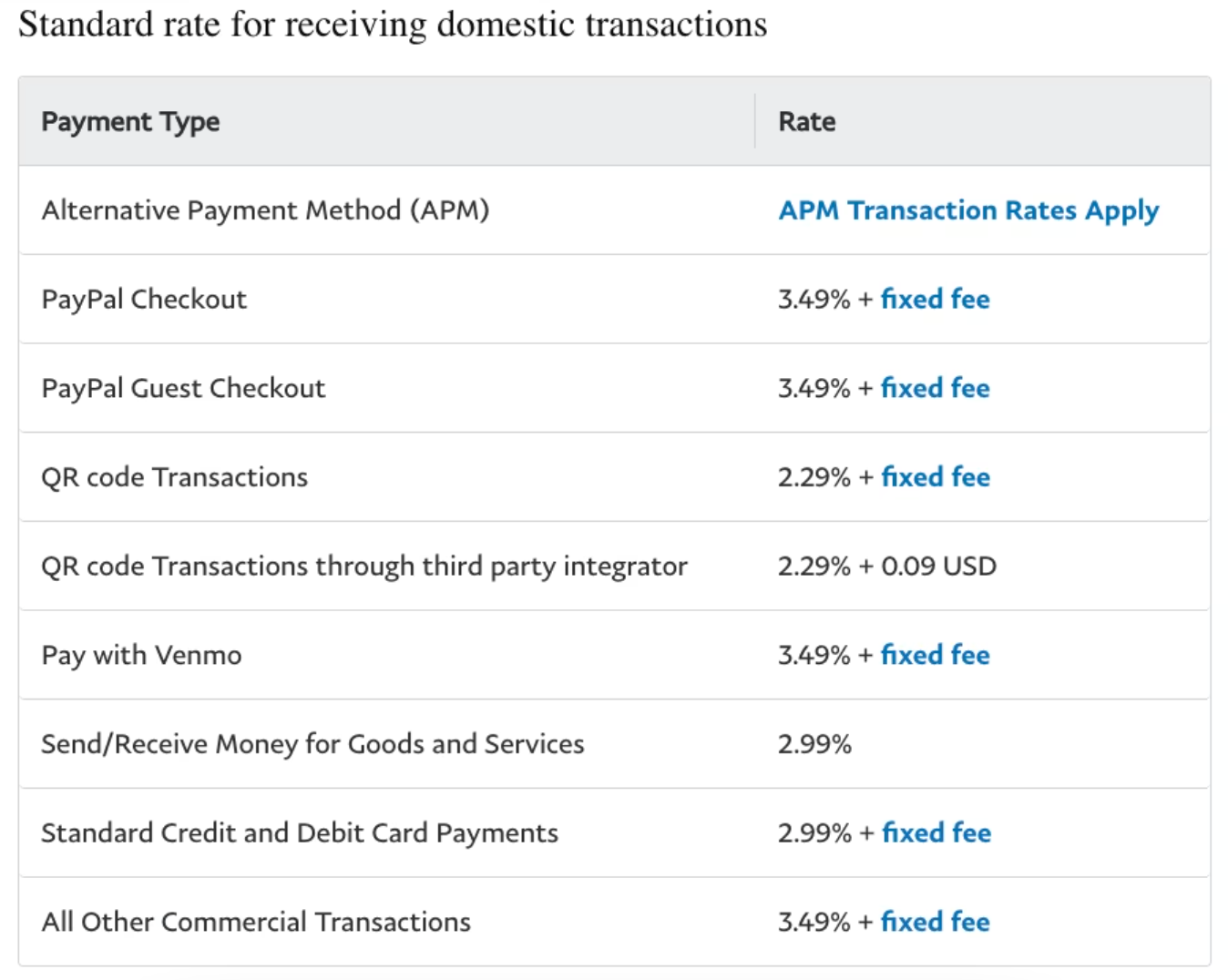
PayPal has many additional fees, while Stripe comes with many built-in features
Stripe primarily charges fees on a per-transaction basis. Some features, such as tax configuration, auditing tools, and data integrations, incur a small additional fee—usually just a few cents or a very low percentage. For businesses with high transaction volumes, Stripe also offers flexible pricing plans tailored to their specific needs.
On the other hand, if you want to customize the checkout interface when using PayPal, you’ll need to pay extra. PayPal’s Payflow Pro plan allows businesses to customize the entire checkout process for $25 per month, plus $0.10 per transaction. Meanwhile, Stripe offers the same feature completely free of charge.
In addition, PayPal’s Payments Pro plan (priced at $30 per month) expands your ability to accept payments via credit card, phone, fax, and even mail. If you want to add advanced features such as account monitoring, fraud protection, or buyer verification, you’ll have to pay an additional monthly fee or per-transaction fee. It’s worth noting that PayPal may assess your account as high-risk and impose an additional 5% fee per transaction.
With Stripe, you don’t have to pay a monthly fee to use these features. Stripe simply charges a small fee per transaction—it’s much simpler and more transparent.
PayPal is better known, but that gap is gradually narrowing
If your customers prefer a familiar brand when making a payment, PayPal is a major player with a clear advantage. Currently, PayPal holds 45.4% of the global market share, far surpassing Stripe, which holds only 18.2%. This means that some customers may feel uneasy if they don’t recognize Stripe on your checkout page.
However, consumers are accustomed to using a variety of different platforms. If customers search for Stripe, they’ll know it’s a reputable platform that many businesses are choosing.
Should I choose Stripe or PayPal?
- If you prioritize brand familiarity and reliability, want things to be simple from the start, and don’t mind paying higher fees or dealing with a complex pricing structure, then PayPal is the right choice for you.
- If you want to keep costs down as your sales volume grows, are willing to learn or hire someone to help with setup, and don’t need a payment brand that’s too well-known, Stripe is the better choice.
If you only sell a few products each month or deal in low-value goods, the cost difference between the two platforms will be negligible. However, as your sales increase, Stripe will save you a few hundred dollars a month compared to PayPal. This savings is enough to cover the cost of hiring someone to set up Stripe, if necessary.
CONCLUSION
Both Stripe and PayPal are reputable payment gateways that effectively meet the transaction processing needs of online businesses. However, each platform is suited to a different target audience, depending on the business model, customer base, and long-term growth strategy. Understanding their similarities and differences in terms of costs, user experience, and scalability will help businesses choose an effective payment solution, reduce operational risks, and optimize revenue as they grow.
CongtySetup assists businesses in selecting, setting up, and operating international payment gateways that align with their legal structure and business objectives. From Stripe and PayPal to other payment platforms, CongtySetup works with you to assess account opening requirements, prepare business documentation, and optimize payment configurations to minimize the risk of account suspension or unnecessary costs. As a result, businesses can confidently expand their cross-border operations safely, efficiently, and sustainably.
Company Setup